
























Yealink MeetingEye 400: Compact Design, Pro Performance
The Yealink MeetingEye 400 stands out as an innovative, all-in-one video collaboration solution, delivering professional-grade performance in a compact form factor.

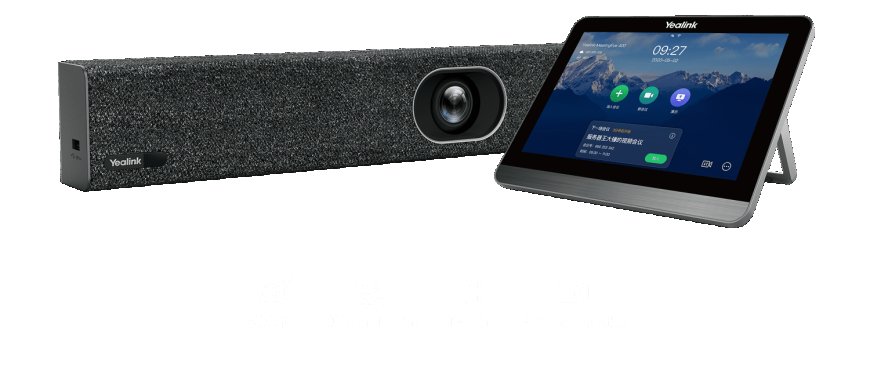
In a rapidly evolving work environment where hybrid meetings are becoming the norm, businesses demand smart, reliable, and space-saving video conferencing systems. The Yealink MeetingEye 400 stands out as an innovative, all-in-one video collaboration solution, delivering professional-grade performance in a compact form factor.
Whether you're outfitting a huddle room or equipping a small team meeting area, the Yealink MeetingEye 400 ensures seamless collaboration. In this article, well explore its key features, practical applications, and why purchasing from an Affordable Electronics store makes your investment even smarter.
Overview of the Yealink MeetingEye 400
The Yealink MeetingEye 400 is an ultra-HD, AI-powered video conferencing bar designed specifically for small meeting spaces. It combines a high-resolution 20MP camera, noise-canceling microphones, and stereo speakers in one sleek unit. The device natively supports Microsoft Teams Rooms and Zoom Rooms, eliminating the need for external PCs or peripherals.
Its plug-and-play functionality and centralized management capabilities make it a favorite among IT teams and business users alike.
Key Features of Yealink MeetingEye 400
Feature Highlights
-
20MP 4K ultra-HD camera with 133 field of view
-
AI auto-framing and speaker tracking
-
Integrated 8-MEMS microphone array with echo cancellation
-
Noise suppression and voice pickup up to 6 meters
-
Native Microsoft Teams and Zoom Rooms compatibility
-
Dual HDMI output for dual-screen support
-
Wireless content sharing via WPP30, Miracast, or AirPlay
-
Remote device management via Yealink YDMP
Performance in Small Spaces
The Yealink MeetingEye 400 is engineered specifically for smaller rooms. Its ultra-wide 133 field of view captures every participant clearly, even when space is limited. The device excels in delivering rich video and audio without the clutter of multiple hardware components.
With its built-in AI capabilities, the camera intelligently frames the group and tracks speakers dynamically. This reduces manual intervention and creates a more natural, engaging meeting experience for both in-room and remote participants.
Simplified Collaboration Across Platforms
Collaboration platforms such as Zoom Rooms and Microsoft Teams Rooms are supported natively. There's no need to bring an external PC or controllerjust connect the MeetingEye 400, log into your platform of choice, and begin your meeting.
For teams operating in hybrid or remote models, the Yealink MeetingEye 400 delivers seamless interoperability, helping bridge the communication gap between physical and virtual attendees.
Audio That Commands Attention
The device is equipped with an array of 8 MEMS microphones that deliver studio-quality voice pickup. It uses advanced noise suppression and acoustic echo cancellation to ensure participants' voices are heard loud and clear, even in noisy environments.
This makes it ideal for conference calls, webinars, client presentations, and internal strategy meetings.
Wireless Content Sharing and Display Flexibility
With the support of dual HDMI outputs, the Yealink MeetingEye 400 can display both participants and shared content simultaneously on two screens. It also enables wireless content sharing via Yealink WPP30, AirPlay, or Miracasthelping teams collaborate with ease and without cable limitations.
Remote Management for IT Teams
The Yealink Device Management Platform (YDMP) enables IT teams to monitor devices, update firmware, troubleshoot problems, and manage configurations remotely. This is a huge advantage for companies managing multiple offices or rooms.
Why Buy from an Affordable Electronics Store?
Purchasing from an Affordable Electronics store ensures you get:
-
Genuine Yealink products
-
Expert consultation before and after purchase
-
Warranty-backed hardware
-
Competitive pricing
-
Fast delivery and flexible return policies
Investing in enterprise-grade collaboration equipment should come with dependable supportand the right store can provide that assurance.
Use Case Scenarios
|
Use Case |
How MeetingEye 400 Helps |
|
Huddle Room Meetings |
Covers all participants with wide-angle 4K video |
|
Remote Client Briefings |
Delivers professional-grade audio and video |
|
Hybrid Team Strategy Sessions |
Ensures clear communication for remote attendees |
|
Internal Training Sessions |
Wireless sharing and dual-screen support |
Summary Box
Why the Yealink MeetingEye 400 Is Worth It
-
All-in-one compact design ideal for small rooms
-
Ultra-HD 4K camera with smart AI framing
-
Seamless integration with Zoom Rooms and Teams
-
High-quality audio with intelligent noise suppression
-
Easy remote management for IT
-
Best value when bought from an Affordable Electronics store
Conclusion
The Yealink MeetingEye 400 offers the perfect blend of compact design and professional performance, making it an excellent choice for small team spaces and hybrid collaboration. With intelligent AI features, seamless platform integration, and robust audio-visual capabilities, this device transforms the way teams connect and communicate.
Choosing to buy from an Affordable Electronics store adds peace of mind to your investmentensuring not just product excellence, but the support and value your organization deserves.
Frequently Asked Questions (FAQs)
1. Can the Yealink MeetingEye 400 work without a PC?
Yes. It is a standalone device with native Zoom Rooms and Microsoft Teams Rooms capabilities.
2. What is the ideal room size for this device?
The MeetingEye 400 is optimized for small-to-medium meeting spaces, typically up to 6 participants.
3. Does it support dual display output?
Yes, it has dual HDMI outputs for simultaneous video and content display.
4. Can I manage the device remotely?
Absolutely. The Yealink YDMP platform provides full remote management capabilities.
5. Is it difficult to set up?
No. The plug-and-play design makes installation simpleeven for non-technical users.
6. Where should I purchase the Yealink MeetingEye 400?
Its recommended to purchase from a certified Affordable Electronics store to ensure authenticity, support, and warranty protection.